
## Ubuntu: A Popular Linux Distribution
**Ubuntu** is a widely used, free, and open-source operating system based on the Linux kernel. Developed by Canonical, it's known for its user-friendly interface and strong community support.
### Key Features:
* **Open-source:** Built on open-source principles, it allows users to modify and share the software freely.
* **User-friendly:** Ubuntu has a clean and intuitive interface, making it accessible to both beginners and experienced users.
* **Security:** It prioritizes security with regular updates and patches to protect against vulnerabilities.
* **Community-driven:** A large and active community contributes to Ubuntu's development and provides support.
* **Versatility:** Available in various editions (Desktop, Server, Core), it caters to different user needs.
### Why Choose Ubuntu?
* **Cost-effective:** Being open-source, Ubuntu doesn't require licensing fees.
* **Stability:** Known for its reliability and stability.
* **Customizability:** Users can tailor Ubuntu to their preferences with a vast array of software packages.
* **Security:** Strong focus on security with regular updates.
**In essence**, Ubuntu offers a powerful, customizable, and secure operating system experience without the cost associated with proprietary software.
**Would you like to know more about specific Ubuntu features, how to install it, or its use cases?**
## Ubuntu Features
Ubuntu offers a robust set of features that make it a popular choice for both home and professional users. Here are some key highlights:
### User Interface
* **GNOME Desktop:** The default desktop environment, known for its clean and intuitive interface.
* **Customization:** Extensive options to personalize the desktop appearance and behavior.
### Software and Applications
* **Ubuntu Software Center:** A user-friendly app store for installing various applications.
* **Open-source Software:** A vast collection of free and open-source software available.
* **Compatibility:** Runs many Windows applications through compatibility layers like Wine.
### Security
* **Regular Updates:** Consistent security patches and updates to protect against vulnerabilities.
* **Firewall:** Built-in firewall for network protection.
* **Open-source Nature:** Enables thorough security audits and community-driven improvements.
### Performance
* **Resource Efficiency:** Ubuntu is known for its efficient use of system resources.
* **Hardware Support:** Excellent compatibility with a wide range of hardware.
### Community and Support
* **Active Community:** A large and supportive user community.
* **Documentation:** Comprehensive documentation and tutorials available.
### Other Notable Features
* **Multi-tasking:** Handles multiple applications efficiently.
* **Stability:** Known for its reliability and stability.
* **Accessibility:** Offers features to assist users with disabilities.
* **Cloud Integration:** Seamless integration with cloud services.
**Would you like to know more about a specific feature or how Ubuntu compares to other operating systems?**
## How to Install Ubuntu
**Installing Ubuntu** is a straightforward process that can be accomplished in a few steps. Here's a basic overview:
### Prerequisites:
* A computer with a minimum of 2GB RAM and 25GB free disk space.
* A bootable USB drive (8GB or larger).
* The Ubuntu ISO image downloaded from the official Ubuntu website ([https://ubuntu.com/download](https://ubuntu.com/download)).
* A tool like Rufus (for Windows) or Etcher (for Windows, macOS, and Linux) to create the bootable USB.
### Steps:
1. **Create a bootable USB drive:**
* Download the Ubuntu ISO image.
* Use Rufus or Etcher to create a bootable USB drive using the downloaded ISO.
2. **Boot from the USB drive:**
* Restart your computer and enter the BIOS or UEFI settings.
* Change the boot order to prioritize the USB drive.
* Save the changes and exit the BIOS or UEFI.
3. **Start the Ubuntu installer:**
* The Ubuntu installer will start automatically. Follow the on-screen instructions.
* Choose your language, keyboard layout, and installation type (default or custom).
4. **Partition your disk:**
* If you choose the custom installation, you can manually partition your disk. For most users, the default option is sufficient.
5. **Install Ubuntu:**
* The installer will copy the Ubuntu files to your hard drive.
* Create a user account and set a password.
6. **Finish the installation:**
* Once the installation is complete, you can restart your computer and start using Ubuntu.
### Important Considerations:
* **Backup your data:** Before installing Ubuntu, it's essential to back up your important data.
* **Dual boot:** If you want to keep your existing operating system, you can choose the dual boot option during the installation.
* **Troubleshoot:** If you encounter issues, refer to the official Ubuntu documentation or online forums for assistance.
**For a more detailed guide with screenshots, refer to the official Ubuntu tutorial:** [https://ubuntu.com/tutorials/install-ubuntu-desktop](https://ubuntu.com/tutorials/install-ubuntu-desktop)
**Would you like to know more about specific steps or troubleshooting tips?**
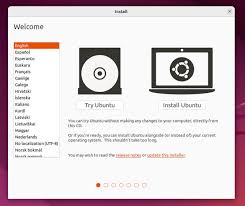
Image citations: [[1]](https://www.zdnet.com/article/how-to-install-ubuntu-linux/)


No comments:
Post a Comment